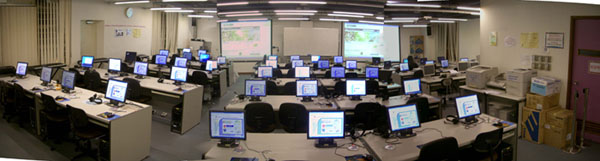
IT Laboratory 1


General Information

IT Laboratory 1

The IT Laboratory 1 , also known as M1 computer room, functions as classroom and user area. When there has no class, faculty student/staff can make use of the computer facilities within our office hours. Besides, a dedicated timeslot has been reserved in this room for students to study the courseware of the university-wide IT competence test. During the specified time, students who want to study the courseware can either access the course material through the Internet or borrow the CD-ROM for our computer staff inside the office. ETU is responsible for the facility management of this room. For any comments, please send to etu@fed.cuhk.edu.hk.


Location :


M/F, Ho Tim Building


Facilities :


  • Multimedia teaching system connected to all students PC
  • 1 networked teacher PC (Pentium IV 3.0GHz, DVD-RW with CD-RW function and external 250MB Zip Drive)
  • 48 strong multimedia student PC (Pentium IV 3.0GHz, DVD-RW with CD-RW function), multi function card reader (SD / MMC / CF / SM / MS) with support of USB and IEEE1394 ports
  • 16 chinese input devices (Penpower)
  • 4 Color Scanners
  • 3 Multimedia Capture System w/ Video capturing device (Pentium IV, CD-RW, Zip drive, Video capture device converting video to AVI, MPG or RM formats)
  • 1 networked B/W laser printer and 1 color laser printer (for transparency only)
  • 3 sets of musical synthesis connected to PCs
  • 1 set computer with document scanner and CD-RW
  • 1 iMac

Planning Item

  • Wireless LAN accessibility
  • Capility to conect to ITSC LAN. (Same as Pi Chiu Building)


Services


  • Connection to ITSC LAN server
  • Student B/W and color printing services
  • Printing-quota refill
  • Video Capture
  • DVD-RW / CD-RW drives ( Media Guidelines )
  • Loan for the IT courseware CD-ROM [ IT Competence Test ]


Available Software


  • Microsoft Windows XP Traditional Chinese with SP3
  • Microsoft Office 2003 Traditional Chinese including Word, Excel, PowerPoint, Access, Outlook, Frontpage
  • Microsoft Producer 2003
  • Microsoft Visual Studio.NET and .NET framework 2.0
  • Kaspersky Antivirus
  • Paint Shop Pro XI
  • Macromedia Dreamweaver 8, Flash 8, Authorware 5.2, Freehand 8.0, Fireworks 3.0
  • Hot Potatoes 6.0
  • Inspiration 8.0
  • HLM 6.06 Student Version
  • LISREL 8.8 Student Version
  • SPSS 17.0
  • X-Class MMLC and Classroom Presenter 3.0
  • JDK 5.0 Update 6 (i.e. J2SDK 1.5.0) with NetBeans 4.1 Bundle (IDE), NetBeans Mobility Pack 4.1 (Add-on for NetBeans 4.1) and Eclipse SDK 3.1.1
  • WinLogo, Poly, Sketchpad, Wingeom and WinStats
  • Networking Tools: Internet Explorer 7.0, Firefox 3.5.1, WS_FTP, WinRAR, SSH, Outlook Express, WinZip, Adobe Acrobat, Djvu plugin, DynaDoc, Apabi Reader, Flash Player and Shockwave Player
  • Multimedia Tools (Real Player, Quicktime, iTune, Winamp, Windows Media Player, Windows Movie Maker, Audacity, dbpowerAmp, , Xnview, DivX Player, WinDVD 5, Ulead DVD Movie Factory, TMPGEnc and VideoPak)


Opening Hours

Mon: 8:45 AM ~ 6:00 PM

Sat: 8:45 AM ~ 12:30 PM

[ Maintenance on each Monday 8:45 AM ~ 1:00 PM ]


Information for new students


IT Lab 1 User Manual / Information

Student How-to


Time Table


Only regular classes have been shown here [ in PDF format ]

Room Reservation

Please contact
(1) General Office to reserve the room; and
(2) Ext. 6901 for computer problems or ext. 6909 for AV problems

IT Exam

All student PCs have allocated a partition for I. T. exam purpose. Click here to read the details of the PC configuration.